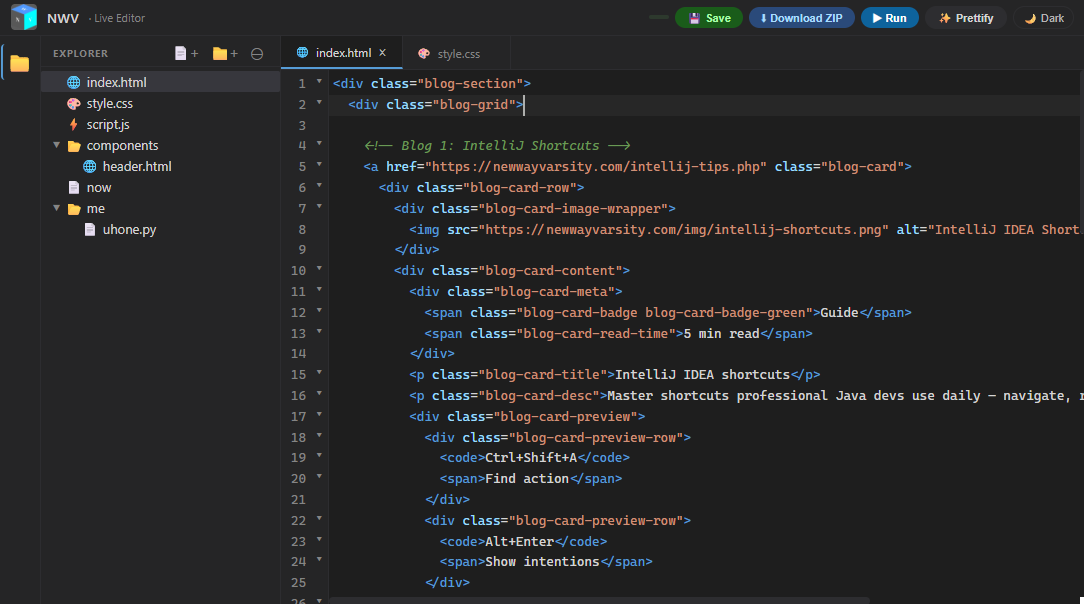
The NWV Live Editor is a full multi‑file IDE that runs in your browser. No setup, no accounts required to start — just open it and write code. Sign in to save your work to the cloud and unlock advanced file management like right‑click create/rename/delete.
Real File Tree & Smart Detection
The sidebar gives you a nested file tree with folders, expand/collapse, and a context menu for quick actions. Create files with extensions like .html, .css, .js, or .json and the editor automatically picks the correct syntax highlighting and language mode. Even .md and .txt files open in a plain‑text monospace view.
Editor Features That Feel Familiar
Built on CodeMirror 5, the editor includes:
- Autocomplete for HTML tags, CSS properties, and JavaScript APIs (press Ctrl+Space).
- Code folding, bracket matching, auto‑closing tags, and active line highlighting.
- Persistent auto‑save — every keystroke is saved to local storage. Logged‑in users also get cloud sync every few seconds.
Live Preview That Combines Your Files
Hit ▶ Run to open a floating, resizable preview window. It scans your entire project, stitches all HTML, CSS, and JS files into a single page, and renders it instantly. The sandboxed iframe prevents accidental redirects or infinite loops from breaking the editor. You can move, resize, minimise, or maximise the preview as you work.
Prettifier & Validator
The built‑in prettifier handles HTML, CSS, JS, and JSON. It formats messy code, checks for unclosed HTML tags, catches JavaScript syntax errors, and displays a collapsible tree view of CSS rules or JSON structures. You can insert the cleaned output directly into the current file.
Download Your Entire Project as a ZIP
Click Download ZIP to package your whole file tree — with folders intact — using JSZip. No server round‑trip needed; it’s generated in your browser and ready to deploy.
What started as an internal prototyping tool has grown into a reliable everyday editor. Give it a try — build a multi‑page prototype, clean up some code, or just experiment with HTML/CSS/JS. Sign in and your work will be waiting for you anywhere.
Open the Live Editor →